USDT Mobile Payments: Sending From a Phone Without Crossing Networks
Most USDT deposits are made with a thumb. The phone adds three hazards that a desktop does not: a short screen that cuts network names, a clipboard that survives between apps, and a send form that remembers the last network used.
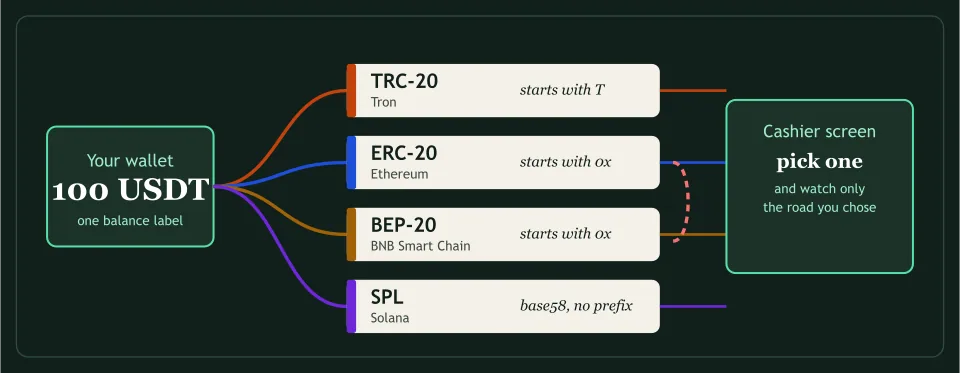
This guide follows one transfer from start to finish and marks each place a network is selected without a decision.
Before opening the wallet
Open the cashier on the phone, choose USDT and choose the network on the screen, then leave the screen open. Switching to the wallet app and back can reload the page and drop the choice, so look at the network name again when you return.
In the wallet’s send form
The form usually opens on a default network, which is often the one used last. Names are shortened on a narrow screen, so “BNB Smart C…” can be the entire label. Tap the selector, read the full name, and compare it with the cashier. Then paste the address and confirm the network field did not change when you did.
After pasting the address
Compare the first four and last four characters against the cashier screen. A small piece of malware can swap a copied address for another one in the clipboard, and the visible start and end are the cheapest check against it. Then send, and look at the amount twice: a phone keyboard is a good way to add a zero.
While waiting
Take a screenshot of the wallet’s confirmation and copy the transaction hash into a note. Roobet says USDT needs three confirmations and BitStarz’s page data sets 19 on the Tron route and 10 on Ethereum Mainnet. Waiting for that count is normal, and the hash is how you check progress on the chain’s explorer.
Cashier notes to read next
Roobet
Names USDT inside a closed coin list and says lost funds follow anything outside it; says nothing about networks.
BitStarz
A visible payments table that names no network, and the page’s own data, which names two.
Vave
Three USDT networks and three different minimums, from help articles last updated in 2023.
Quick answers
| Can a QR code carry the network? | A code that holds an address, and sometimes an amount, does not normally say which chain to use. Check the network in the wallet after scanning. |
|---|