USDT on a Phone: Where Wrong-Network Mistakes Are Easiest to Make
A phone is the usual place a USDT deposit is made and the easiest place to make a mistake in it. The screen is small, the apps swap in and out, and the wallet quietly keeps the choice it made last time.
This page lists the specific features of a phone that cause wrong-network transfers. The step-by-step walkthrough lives in the [[/blog/usdt-mobile-payments/|guide on mobile payments]].
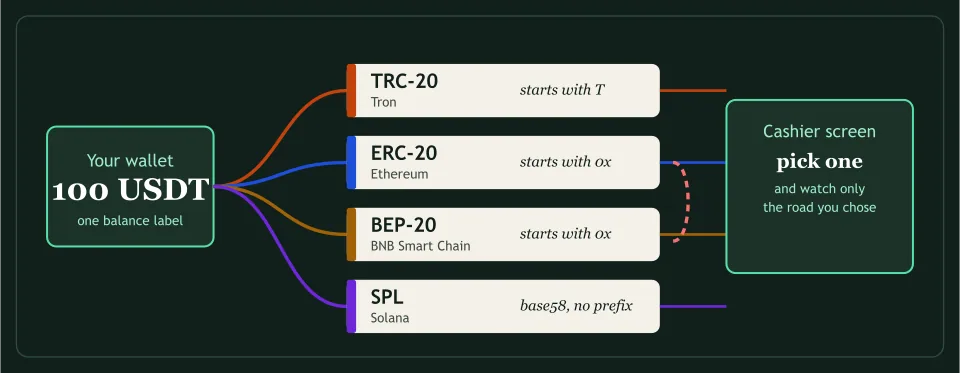
Check the network before the address
A wallet’s send screen opens on a default network, often the one last used or the one holding the biggest balance. On a narrow screen the name is shortened, so the whole label may read “BNB Smart C…”. Tap the selector, read the full name, and compare it with the cashier’s. Only then paste an address.
Does a QR code carry the network?
A code that holds an address, and sometimes an amount, does not normally say which chain to use. Scanning fills the address field and leaves the network field as it was. After a scan, check the network as if you had typed the address by hand.
Copy, paste and compare
Some malware swaps a copied address for another in the clipboard. The cheapest defence is to compare the first four and the last four characters with the cashier’s screen after pasting. It takes seconds and it is the one check that protects against a mistake you did not make yourself. Make it a habit that survives hurry: the day you skip it is the day the clipboard has been changed, and the wallet will not tell you, because from its side the address you pasted is perfectly valid.
Two apps, two vocabularies
When USDT comes from an exchange’s app, that app asks for a network in its own words, and the cashier uses different ones. Stake writes BSC (BEP20), Duelbits Binance Smart Chain, Cloudbet BNB Smart Chain. Match the chain behind the words, never the words, and leave the transfer if you cannot tell.
Two cashiers that name routes for USDT
Vave
Three USDT networks and three different minimums, from help articles last updated in 2023.
BitStarz
A visible payments table that names no network, and the page’s own data, which names two.
Short answers
| Can a QR code pick the network for me? | Not normally. It carries an address and sometimes an amount; the wallet’s network field still has to be checked. |
|---|---|
| Why compare the first and last characters of an address? | A clipboard can be altered by malware, and the start and end are the part that is quick to check by eye. |